
This article is part of the Building an E-commerce AI Agent with AWS Serverless series:
- Understanding AI Agents (here)
- Choosing the Right Runtime
- Building Product Search and RAG
- Conversation Memory and Context Management
- Connecting the Agent to Your Webshop
- Security, Privacy, and Observability
- The Sample Application
Source code: https://github.com/ServerlessLife/ecommerce-ai-agent
What we are building
We are building an AI-powered shopping assistant for an e-commerce website. It will provide a chat-based interface where visitors can find products, ask questions, and interact with the shop using natural language.
Our goal is to integrate the assistant into an existing webshop with as few changes as possible, rather than rebuilding the website around AI.
What the assistant will do
The assistant should help visitors throughout their shopping journey:
- Find products: Understand what customers are looking for, even when they describe their needs rather than use exact product names.
- Answer product questions: Explain product features, provide additional information, and help customers compare alternatives.
- Assist with shopping: Help customers select products and add them to their cart.
- Answer common questions: Provide information about delivery, returns, and other shop-related topics.
- Support registered customers: Access relevant account information, such as past orders, and perform operations available to authenticated users.
The assistant will be available to both anonymous visitors and registered customers, with different capabilities depending on whether the user is authenticated.
We also want to support non-English webshops. This is an important requirement because language affects our choice of LLM, embeddings, search and ranking techniques, and guardrails.
Why build a shopping assistant?
A conversational interface gives visitors another way to interact with an online shop. Instead of figuring out which keywords to enter or navigating through multiple product categories, customers can simply explain what they need.
This can make product discovery easier, encourage exploration, and potentially improve the shopping experience.
There is also the novelty factor. AI is still interesting to many customers, and a shopping assistant may attract attention simply because it offers something different from a traditional webshop.
Technical considerations
We want the assistant to be practical to integrate, operate, and maintain. A few requirements will influence our architecture:
- Minimal integration effort: Add the assistant to an existing webshop without major changes to the application.
- Multilingual support: Handle customer conversations and product information in languages other than English.
- User context and permissions: Distinguish between anonymous and authenticated customers, especially when accessing personal information or performing account-specific operations.
- Cost control and abuse prevention: Since the chat is publicly accessible and every LLM request costs money, we need to prevent individual users or bots from consuming resources without limits.
These requirements will guide the technical decisions we make throughout the series.
Before choosing the architecture and implementation, let's look at how a simple chat interface can evolve into a more capable e-commerce AI agent.
Do you need temporary or permanent help on your project?Evolution of an e-commerce AI agent
We can build the experience in three stages, adding capability at each step.
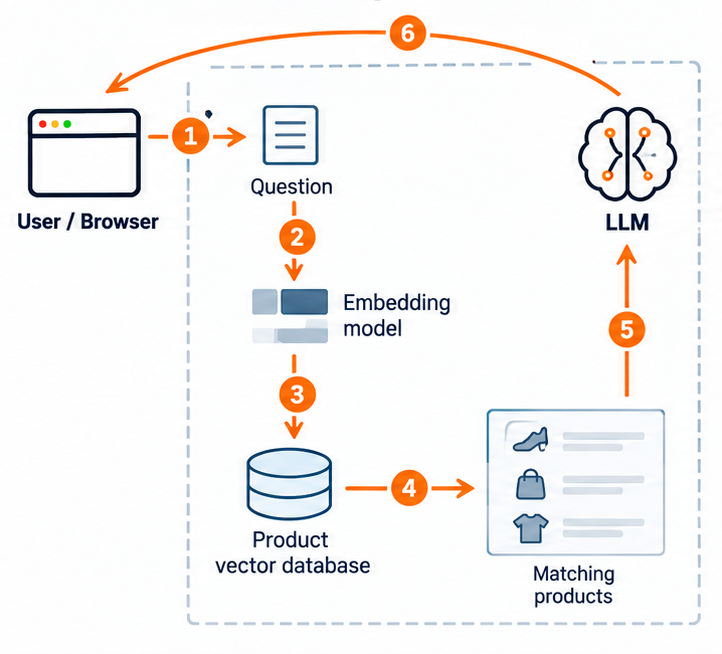
A simple chat
The first version has a chat window, but it follows the same steps for every question.
- The customer asks a question in the chat.
- An embedding model converts the question into numbers (a vector).
- Vector search compares that vector with product embeddings prepared earlier in the product vector database.
- The search returns matching products.
- We send the question and matching products to an LLM, which writes an answer with product links.
- The answer is returned to the customer in the chat.
The LLM writes the answer, but does not choose what to search or call tools. Each message starts a fresh search, so it cannot understand “What about a cheaper one?” as a follow-up.
Improving chat
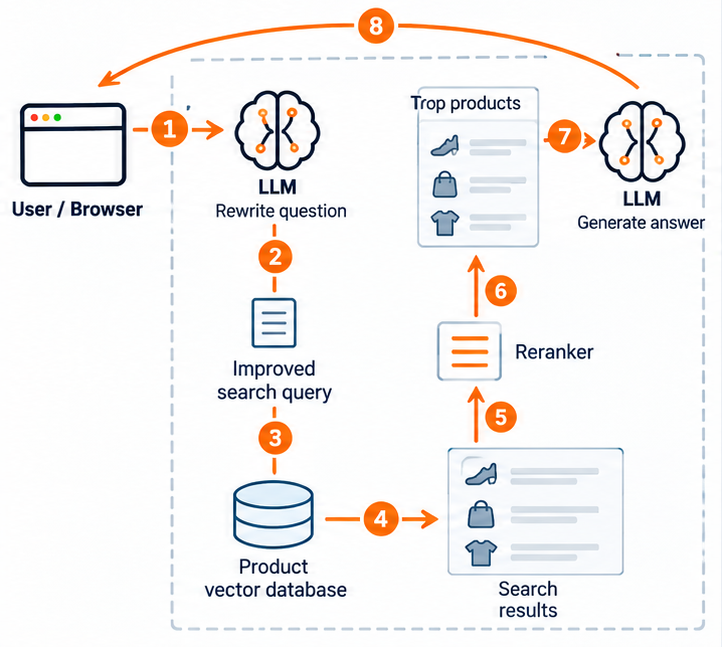
Next, we improve the fixed path by rewriting questions and reranking search results.
- The customer asks a question, such as “My feet get wet when I run in the rain. What should I buy?”
- An LLM rewrites the question as a better product search query, such as “waterproof running shoes.”
- We search the product vector database using the improved query.
- The search returns candidate products.
- We send those search results to a reranking model.
- The reranker compares the products with the query and selects the most suitable ones.
- We send the top products to an LLM to generate an answer.
- The answer is returned to the customer in the chat.
There is still no conversation history at this stage.
A real AI agent
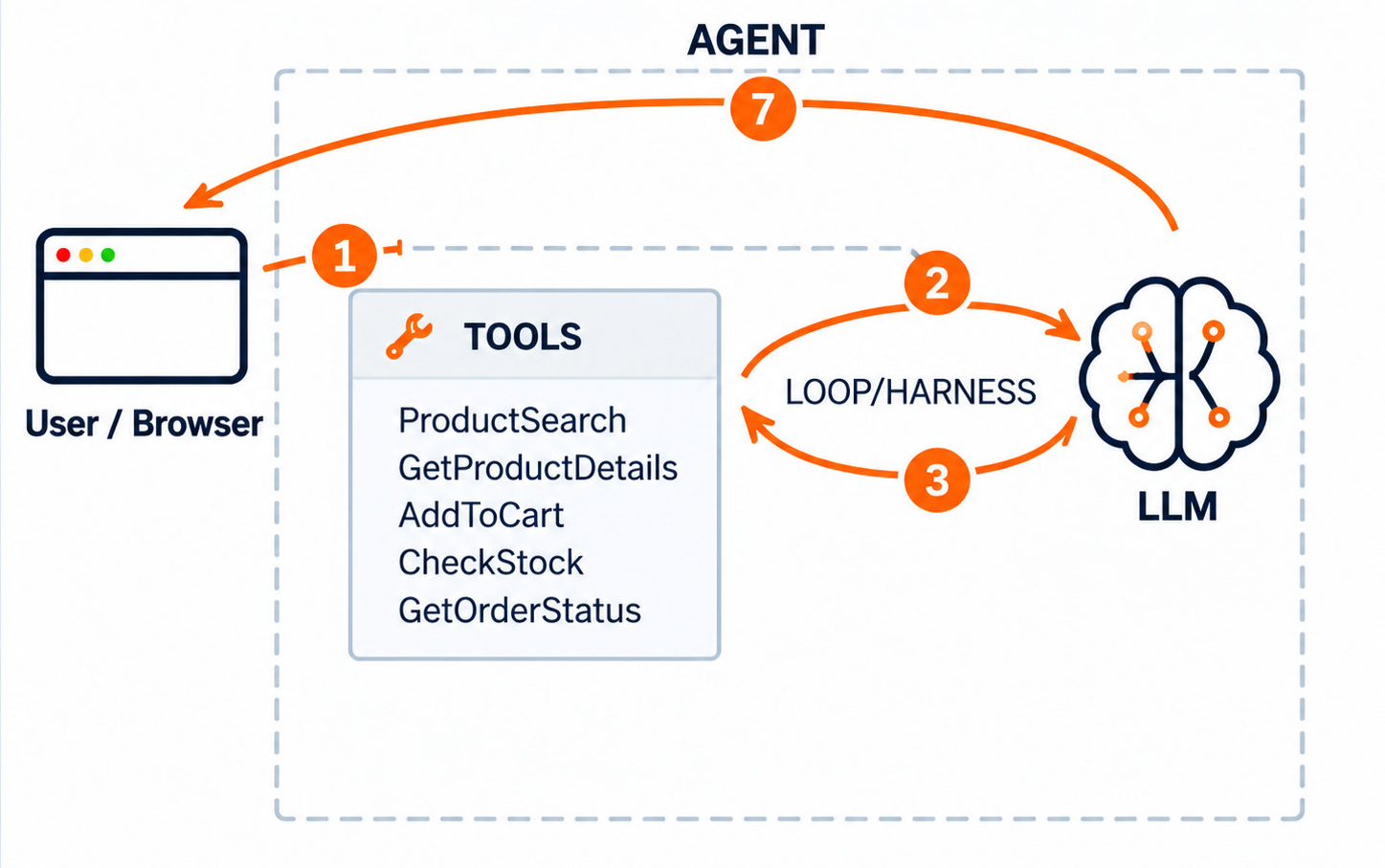
With a real agent, the LLM receives the conversation and decides which tools to call, rather than following a fixed sequence. It can understand follow-up questions like “What about a cheaper one?”, search for products, fetch details, or request an add-to-cart action. The harness executes tool calls and returns their results to the LLM until it can answer. We will explore how this works in more detail later.
How AI agents work
An AI agent repeatedly asks a large language model (LLM) what to do next. The LLM can ask to use a tool. A tool is simply a function with a name and inputs. The agent's code, called a harness, runs the tool, sends the result back, and asks the LLM again. The loop stops when the LLM gives a final answer.
Tools in our example can:
- search for products
- check stock or delivery options
- add an item to the cart
- look up an order status
Let’s check an example:
- The user sends a question from the browser to the agent.
- The agent sends the question to the LLM with the system prompt, conversation context, and available tools.
- The LLM rephrases the question to better match vector search. It then instructs the agent to call the search tool, providing the required parameters.
- The agent executes the search tool and sends the product search results back to the LLM as context.
- The LLM generates the final answer, which the agent returns to the user in the browser.
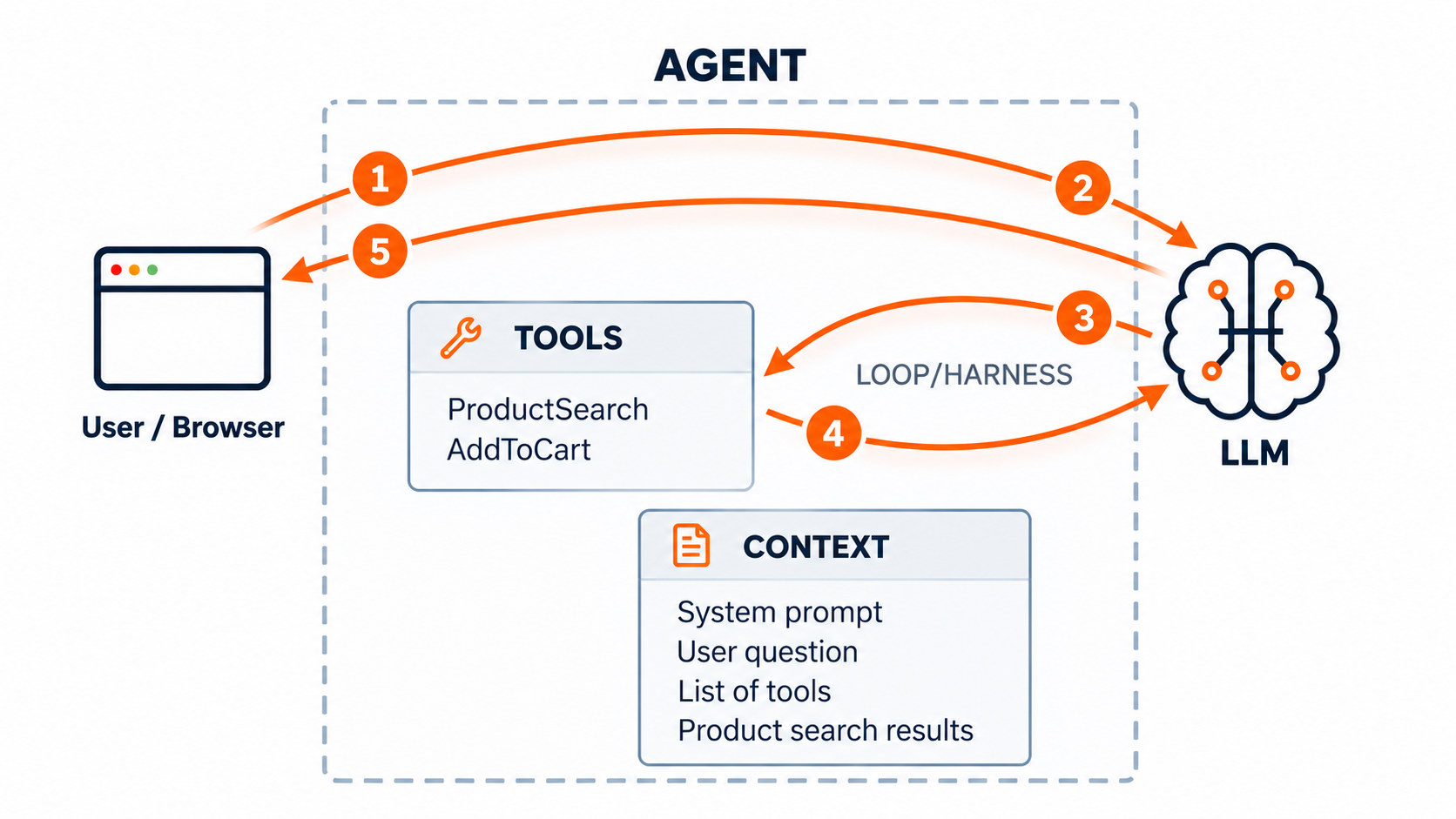
Each LLM call is an API request. The model itself does not remember earlier calls, so the harness sends the context again: messages, tool requests, and results. That means the longer the conversation is, the more expensive it becomes. But we do not have to pay full price each time, because the LLM provider can cache the beginning of the conversation if it does not change. Cache hits are not guaranteed, and cached tokens are still billed.
One tool call is rarely enough. A real question — "Which of these is better for a small balcony, and can you add it to my cart?" — needs a search, then a stock check, then an action, then a written answer. The runtime repeats the model–tool interaction loop until it can provide the final answer.
Tools can be executed on a client
Tools are essential to AI agents. But a tool does not have to run on the server. For example, an add-to-cart action can be sent to the customer's browser, which updates the cart on the page.
- The user sends a question from the browser to the agent.
- The LLM instructs the agent to call the
add-to-carttool. - The agent forwards the tool call to the client.
- The client executes the tool call. It is the same as user would press “Add to cart” button. Results, complete cart is sent back to the agent.
- The agent sends the tool result to the LLM along with the conversation history.
- The LLM generates the final answer, and the agent forwards it to the user.
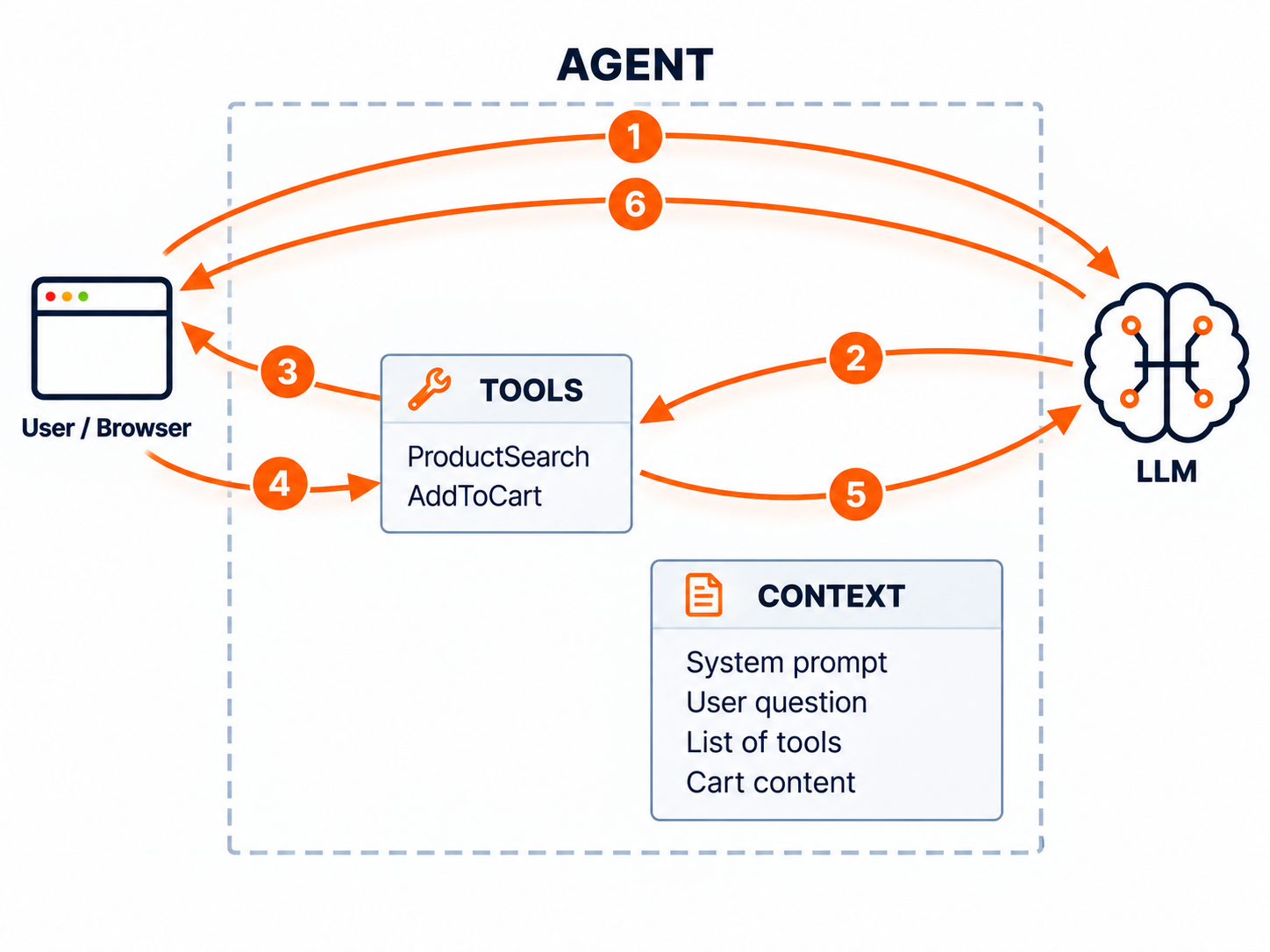
Running tools in the browser lets the agent use features the webshop already has, such as using the webshop's add to cart functionality. This makes integration easier, avoids duplicating that functionality on the server, and helps address security concerns by keeping existing webshop operations in the browser. For the integration and security advantages, see Keeping webshop authentication separate in Part 6.
FAQs as a skill
Not every question requires searching a vector database. Customers also ask practical questions such as “How much does shipping cost?”, “Can I return an opened product?”, or “Which payment methods do you accept?”
Most webshops already have this information in a few FAQ pages. The content is relatively small and doesn't change very often. We could store it in our vector database and use RAG, but that would be overkill. A skill is a much simpler solution.
If you've used coding agents, you're probably already familiar with skills. These are exactly the same concept. A skill is a folder containing instructions and optionally additional files that an agent can load when needed.
Skills are implemented using tools, just like our product search and add-to-cart functionality. The Strands Agents framework already supports this through AgentSkills, so we don't need to build the mechanism ourselves.
How does it work?
We create an FAQ skill containing a document with answers to common questions about shipping, payments, and returns.
We add a short description of the skill to the agent's system prompt, telling it when and how to use it.
When a customer asks a relevant question, for example about delivery, the LLM decides to use the skill and requests a tool call to read its files.
The agent loads the FAQ document and includes its contents in the LLM context.
The LLM uses that information to answer the customer's question.
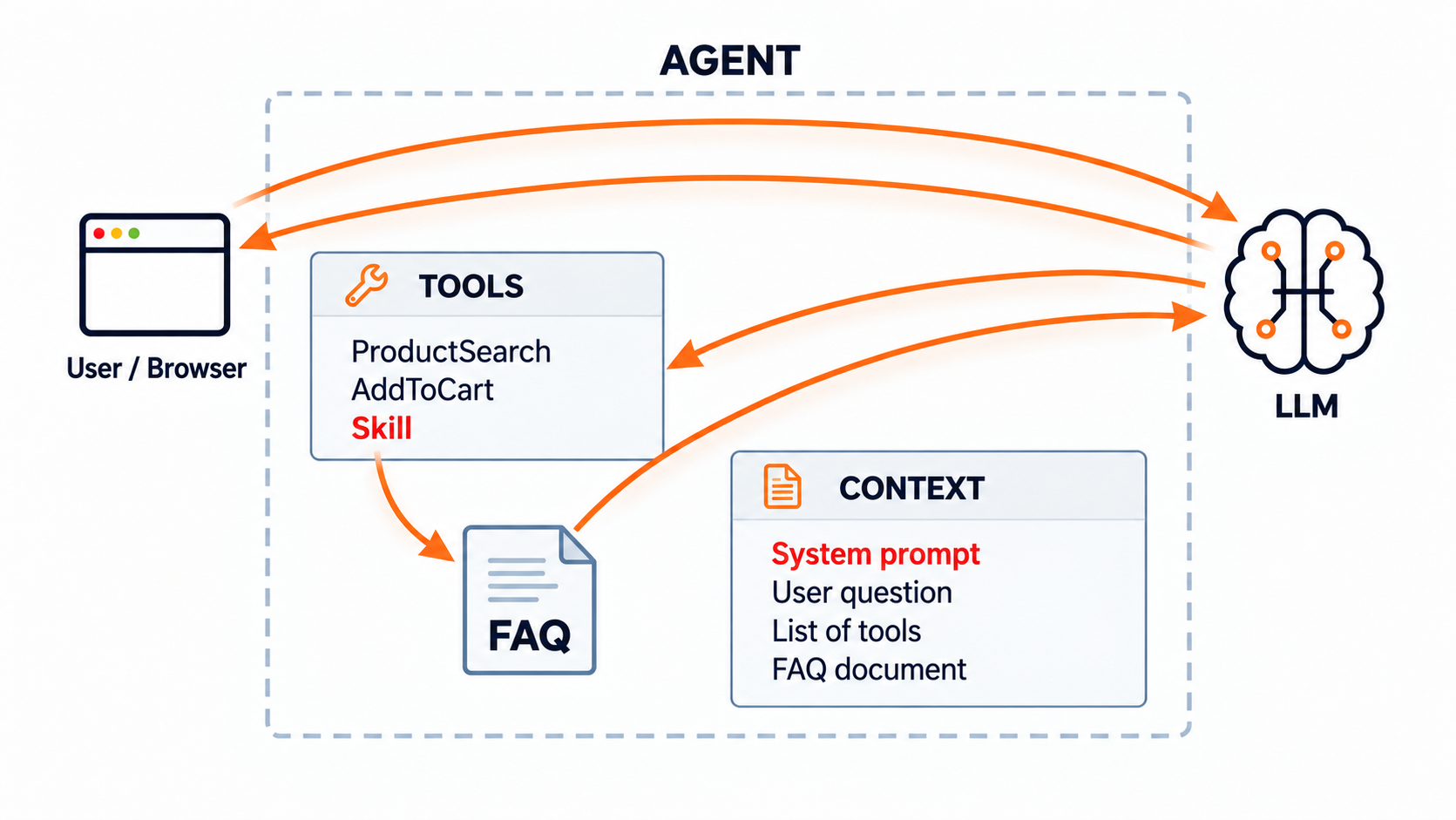
The important part is that the full FAQ document is not included in every LLM request. The agent knows the skill exists but only loads its contents when needed. This keeps the context smaller and reduces token usage.
Search and Retrieval-Augmented Generation (RAG)
LLMs are trained on vast amounts of information, but they know little about our business, our products, or what we currently sell.
The simplest way to solve this is to retrieve relevant information from our own data sources and include it in the context sent to the LLM. This approach is called Retrieval-Augmented Generation (RAG).
In fact, we already used RAG in the previous chapter. When the agent called the ProductSearch tool, it retrieved matching products and passed them to the LLM, allowing it to answer using actual product information rather than relying on its training data.
RAG is not tied to any particular database or search technology. We can retrieve information using SQL queries, APIs, keyword search, or even static files.
However, one of the most popular approaches is semantic (vector) search. Unlike traditional keyword search, which looks for matching words, semantic search finds information based on meaning. This is particularly useful for an e-commerce assistant, where customers often describe what they need rather than knowing the exact product name.
Let's explore the different search methods and how they work.
Do you need temporary or permanent help on your project?Semantic (vector) search
Semantic search tries to find products by meaning rather than exact words. This is useful when a customer does not know the product name or uses different wording from the catalogue.
To make this possible, an embedding model converts text into a vector — a list of numbers that represents patterns and relationships in the text. A useful mental model is to imagine product descriptions placed on a map where texts with similar meanings tend to appear close together.
How semantic (vector) search works:
User question: The customer asks: “I'm going on a hike and need something to keep my drinks cold for the whole day.”
Create query embedding: An embedding model converts the question into a vector — a numerical representation of its meaning.
Search product vectors: The query vector is compared with product embeddings already stored in the vector database. These were generated from product descriptions during ingestion.
Find similar products: Vector search identifies products with similar meanings, even when they use different words. In this example, insulated bottles are a better match than hiking shoes, tents, or backpacks.
Return relevant products: The search returns products such as insulated water bottles, thermos bottles, and cooler bags.
The key advantage is that semantic search matches meaning, not just keywords. The customer never mentioned an insulated bottle, but the search can still identify it as a relevant product.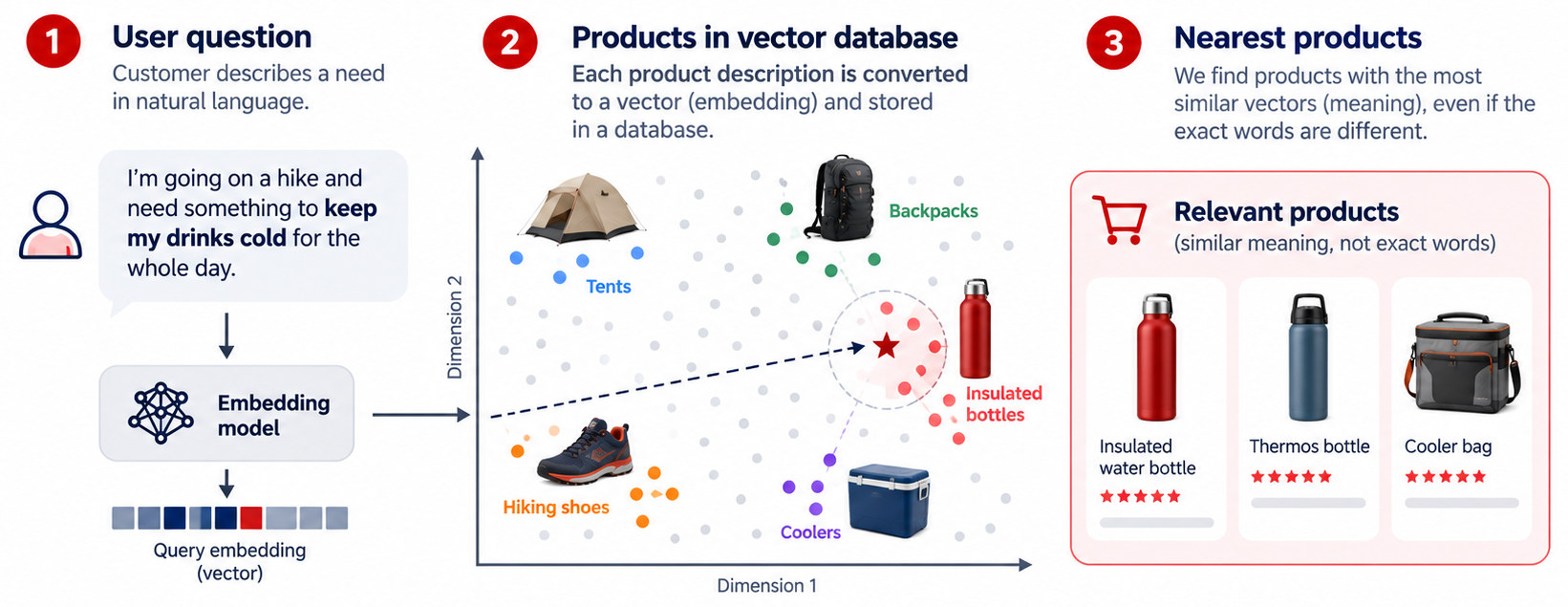
Vector search is especially useful for natural-language and problem-based queries, but it is not ideal for every type of search. Exact product names, model numbers and SKUs are often better handled by keyword search, while strict requirements such as price, size, brand or availability are usually better handled with filters.
We implement semantic search as part of the product search solution in Part 3: Building Product Search and RAG.
Keyword (full-text) search
Keyword search is the most common search we have known for ages. It matches words in the request against words in the catalog. Someone looking for “iPhone 15” expects that exact name near the top. It is excellent for model numbers, brands, and other precise terms. It struggles when the customer describes a problem instead of using the wording on the product page.
Sparse neural search
Sparse neural search sits somewhere between traditional keyword search and semantic vector search. Like keyword search, it works with words (tokens), but it uses a neural model to understand which terms are important and which related terms might be useful.
Suppose a customer searches for “shoes for wet trails”, while a product is described as “waterproof hiking trainers”. Traditional keyword search might struggle because the words don't match exactly.
A sparse neural model converts the text into a list of tokens with weights representing their importance. It can also expand the text with related terms learned during training. For example, it might associate “wet” with “waterproof” and “trails” with “hiking”.
Unlike dense vector search, which compares numerical representations of meaning, sparse neural search compares weighted tokens. This allows it to use an efficient inverted index, similar to traditional keyword search.
The main advantage is that it combines some semantic understanding with precise term matching. However, its effectiveness depends on the model and language, and it may not capture broader meaning as well as dense vector search.
Hybrid search
Hybrid search combines multiple search methods, most commonly keyword and semantic search, to get better results than either method alone.
For example, a customer searches for “a 120 cm oak desk for a small room.”
- Keyword search finds products with exact terms such as “oak” and “120 cm”.
- Semantic search finds compact desks and similar furniture, even when the descriptions use different words.
Both methods return their own search results. Hybrid search combines them into a single ranked list, giving higher priority to products that are relevant in both searches.
There are different ways to combine the results. One common method is Reciprocal Rank Fusion (RRF), which uses each product's position in the search results rather than comparing relevance scores.
The main advantage is that hybrid search combines the precision of keyword matching with the flexibility of semantic search. However, strict requirements such as price, dimensions, and availability should still be enforced using filters.
Comparison
| Method | Best for | Watch out |
|---|---|---|
| Keyword | Exact names, brands, codes | Misses different wording |
| Vector | Needs described in plain language | Can miss exact codes |
| Sparse | Related word matches | Depends on model and language |
| Hybrid | Exact + natural-language queries | More setup and tuning |
Reranking
Vector, keyword, and hybrid search can find relevant products, but they don't always rank the best matches first. Reranking improves search results by taking the top candidates and evaluating each one more carefully against the user's question.
For example, a customer asks: “I need lightweight, waterproof hiking shoes with good ankle support.” Vector search might return several related products, but a reranking model can better identify which ones satisfy all three requirements.
A typical flow:
- Search: Retrieve the top 20–50 products.
- Rerank: Evaluate and reorder them using a reranking model.
- Select: Pass the best 5–10 products to the AI agent.
There are several approaches to reranking:
- Cross-encoder models: Evaluate the query and each product together for more accurate relevance scoring.
- LLM-based reranking: Ask an LLM to evaluate or compare the candidates.
- Rule-based reranking: Adjust rankings using business rules, such as availability or product popularity.
When reranking makes sense:
- Complex questions with multiple requirements.
- Recommendations with many similar products.
- Searches where the initial results are poorly ranked.
When it doesn't:
- Exact product names or SKUs.
- Simple searches with obvious matches.
- Searches that return only a few products.
Reranking adds latency and cost, and it cannot recover products missed by the initial search. It also doesn't replace filters for price, size, or availability.
Can the AI agent decide? Yes. We can expose reranking as an optional tool or a parameter of the product search tool. The agent can then request reranking for complex queries and skip it for simple lookups. Alternatively, we can use predefined rules to make the decision without another LLM call.