
This article is part of the Building an E-commerce AI Agent with AWS Serverless series:
- Understanding AI Agents
- Choosing the Right Runtime (here)
- Building Product Search and RAG
- Conversation Memory and Context Management
- Connecting the Agent to Your Webshop
- Security, Privacy, and Observability
- The Sample Application
Source code: https://github.com/ServerlessLife/ecommerce-ai-agent
Do you need temporary or permanent help on your project?Building an AWS Serverless AI Agent
Why serverless?
The usual reasons for choosing serverless still apply to AI agents:
- Pay only for what you use
- Autoscale
- No servers or containers to manage
- High availability
But there is an even more important reason. In recent years, AWS has built a wide range of services specifically for developing and running AI agents. Most of the components we need are already available, allowing us to build solutions much faster.
Is serverless expensive? For a regular serverless project, the answer is that it is usually cheaper if you count the total cost of ownership. But here the answer is different. LLM costs will likely be much higher than the cost of running the agent itself. So the price is not that important.
But what matters much more is fast time to market. Imagine building 100 prototypes, but only one succeeds. With serverless, you would pay almost nothing for the projects that failed. You would pay only for the one that succeeded.
That's the real power of serverless: building and testing ideas faster, with minimal upfront costs, and scaling only the ones that succeed.
Picking a runtime
AWS offers three serverless options for running a custom AI agent: traditional AWS Lambda (Lambda Event), Lambda Web Functions, and Amazon Bedrock AgentCore Runtime.
Classic Lambda Event Function billing is optimized for fast responses with high CPU usage. But AI agents are the opposite. They are slow because LLMs are slow, and they don't use much CPU because they mostly just stream the LLM response. That's why it's so important that AgentCore and Lambda Web Functions have separate CPU and memory billing.
AWS Lambda Event
Traditional AWS Lambda is the simplest option. Each invocation runs the agent, handles LLM and tool calls, and returns a response. Streaming is supported through Lambda Function URLs or compatible API Gateway REST API integrations.
The main limitation is billing. Lambda charges for configured memory over the entire invocation duration, including time spent waiting for external services. CPU allocation is proportional to configured memory. For example, if our agent takes 10 seconds to answer but spends 8 seconds waiting for an LLM, we still pay for all 10 seconds.
Each concurrent invocation needs a separate execution environment. AWS may reuse environments between requests, but we cannot rely on this to preserve conversation state. We therefore need external storage for conversation history.
Lambda has a maximum invocation duration of 15 minutes.
Despite these limitations, Lambda Event is often the cheapest option for short, occasional requests. It is also an excellent choice for background tasks such as ingestion, embedding generation, and data processing.
AWS Lambda Web Functions
Unlike traditional Lambda, Lambda Web separates CPU and memory billing. Each execution environment has 2 Arm64 vCPUs and up to 2 GB of memory. We pay for the CPU time the application and runtime actively consume, not for CPU time spent waiting for an LLM or external API. Memory is billed based on consumption over the lifetime of the execution environment, including idle time between requests. Requests and data transfer are charged separately.
Another important advantage is concurrency. A single execution environment can handle multiple concurrent HTTP requests. While one conversation waits for an LLM response, the same environment can process other conversations.
However, there are some limitations:
Memory remains billable while the environment is active.
In my measurements, an environment remained alive for approximately six minutes after the last response, increasing costs. This duration is not documented by AWS.
Conversation state still needs external storage because requests are not tied to dedicated environments.
Maximum request duration is 15 minutes.
Lambda Web can be more cost-effective than traditional Lambda under sustained concurrent workloads, especially when requests spend most of their time waiting for I/O. Actual savings depend on concurrency, memory consumption, and environment lifetime.
Amazon Bedrock AgentCore Runtime
Amazon Bedrock AgentCore Runtime is designed specifically for AI agents. It offers two compute options: serverless microVMs and EC2-backed Instances.
AgentCore Runtime MicroVMs
With MicroVMs, each conversation session gets its own isolated execution environment, with dynamically allocated resources up to 2 vCPUs and 8 GB of memory.
AgentCore uses consumption-based billing with separate CPU and memory charges. When the agent waits for an LLM or tool and no background processing uses CPU, CPU charges can fall to zero.
Memory is billed separately and includes the entire runtime environment, which is different comparing to Lambda Web Function.
Stateful sessions are AgentCore's main advantage. The same process can remain alive between messages, allowing us to keep the Strands agent and conversation history.
By default, idle sessions terminate after 15 minutes, although this is configurable. For our agent, reducing the timeout to a few minutes may significantly lower costs. The maximum session lifetime is 8 hours. Persistent storage is therefore still necessary to resume conversations after a session expires.
AgentCore Runtime Instances
AgentCore also supports EC2-backed Instances, with sessions lasting up to 14 days.
However, each session maps to a dedicated EC2 instance, making this option unsuitable for our shopping assistant. Instances are better suited to resource-intensive or long-running agents. We will therefore focus on serverless microVMs.
AgentCore Runtime V1 vs V2
AgentCore Runtime V1 is still the default, but V2 introduces two important improvements:
- Faster cold starts: V2 uses snapshots to restore execution environments instead of starting them from scratch.
- Better memory management: V2 can reclaim unused memory, including idle memory after approximately two minutes. V1 does not support the same elastic memory reclamation.
V2 has higher CPU and memory unit prices, but better memory management can make it cheaper overall. Which version costs less depends on the workload.
AgentCore Runtime billing and usage logs
AgentCore Runtime charges separately for CPU and memory usage. CPU costs depend on how much processing the agent performs, while memory costs can continue even when the agent is idle.
Each conversation runs in its own isolated microVM, which remains available between questions. We can configure a session idle timeout to control how long the environment stays alive after the last request.
The following graph shows the CPU and memory costs per second for a single conversation.
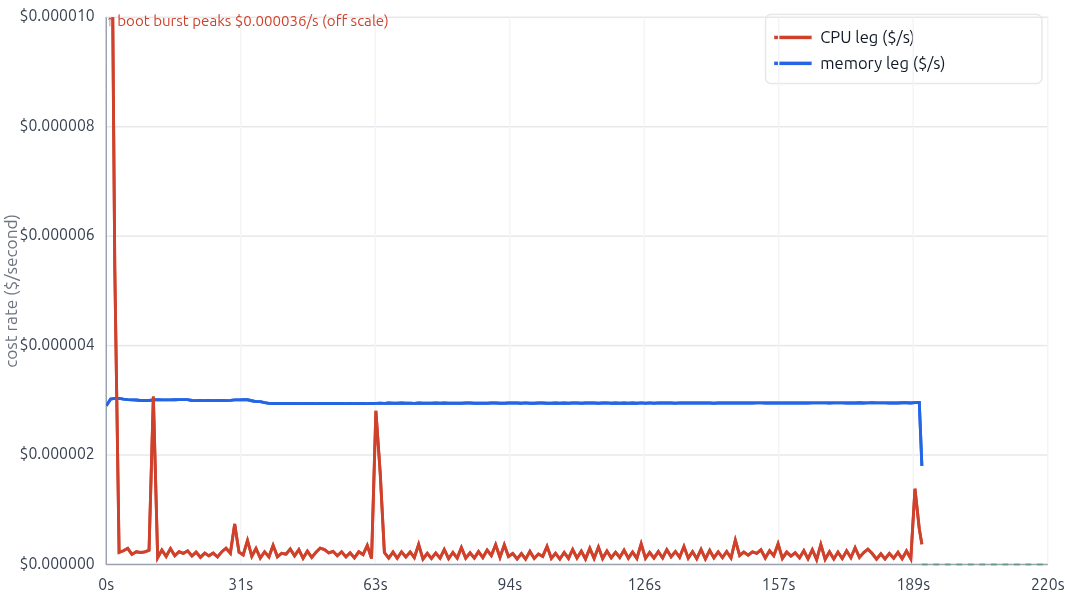
Here's what happens during the session:
Startup and first question: A large CPU spike appears as the agent starts and processes the first request.
Second question (~1 minute): Another question causes a smaller CPU spike.
Idle period: CPU usage drops, but we continue paying for memory while the session remains alive.
Session shutdown (~3 minutes): Two minutes after the second question, the configured idle timeout is reached and the microVM shuts down.
The interesting finding is that for our agent, memory accounts for most of the runtime infrastructure cost. CPU usage is concentrated in short bursts, while memory costs accumulate throughout the session.
This also means that choosing an appropriate session idle timeout can make a significant difference to the total cost.
Tracking costs per conversation
We generated the costs graph using AgentCore's usage logs.
Each usage record contains information such as the session ID, elapsed time, vCPU usage, and memory usage. By grouping these records by session, we can calculate an estimated infrastructure cost for each conversation instead of relying only on the total AWS bill.
Usage logs are not enabled automatically. They are a separate AgentCore log type that we must explicitly configure.
With AWS CDK, we can send them to a CloudWatch log group:
loggingConfigs: [
  {
    logType: agentcore.LogType.USAGE_LOGS,
    destination: agentcore.LoggingDestination.cloudWatchLogs(usageLogGroup),
  },
],
These logs let us see how much individual conversations cost and identify opportunities to reduce runtime expenses.
Keep in mind that these calculations cover AgentCore Runtime infrastructure only. LLM inference and other AWS services are billed separately.
Comparing the runtimes
| Feature | Lambda Event | Lambda Web | AgentCore |
|---|---|---|---|
| Instance per session | ❌ | ❌ | ✅ |
| Max turn duration | 15 min | 15 min | 8 h |
| Separate CPU / memory billing | ❌ | ✅ | ✅ |
| Concurrent sessions per instance | ❌ | ✅ | ❌ |
| Stateful between turns | ❌ | ❌ | ✅ |
| Configurable idle timeout | ❌ | ❌ | ✅ |
| Streaming | ✅ | ✅ | ✅ |
Price and performance test
To compare the hosting options with real numbers, I deployed the same demo agent, unchanged, to four platforms — Lambda Event Function, Lambda Web Functions, AgentCore Runtime V1, and AgentCore Runtime V2 — and measured speed and cost under very different traffic patterns: isolated single questions spaced minutes apart, a parallel burst, and a sustained multi-turn conversation. The agent is deliberately minimal (one product-search tool, a small model on Bedrock), so the platform's own overhead shows. For each request I recorded the latency and calculated the cost from the actual usage logs, cross-checked against the real AWS bill.
You can review the complete testing setup — infrastructure, traffic scripts, and analysis code here.
This was a small-scale test, so treat the numbers as directional, not exact — even a small change to the agent (its size, memory, or how long it talks to the model) shifts the results. The exact numbers might change, but the general trends should be similar.
Performance:
- AgentCore adds ~1–2 s of startup overhead to the first question of a session.
- Once a session is warm all platforms showed similar performance
- AgentCore V2 did not improve cold-start performance compared with V1. The agent is small, so snapshot-based startup offered little benefit.
Cost:
- Lambda Event Function is the cheapest for occasional, sparse requests.
- Lambda Web Function can be cheaper than Lambda Event Function under sustained concurrent workloads. In my measurements, its execution environment remained alive for approximately six minutes after the last response, adding billable memory time. AWS does not document exact time.
- AgentCore V1 runtime infrastructure costs were ~8–12× those of Lambda Event for a single question, and ~7× for 10 questions over 10 minutes.
- AgentCore V2 runtime infrastructure costs were ~20–35× those of Lambda Event for a single question, and ~20× for 10 questions over 10 minutes.
- Longer, stateful agents are where AgentCore makes sense. As conversations get longer, AgentCore's relative cost disadvantage decreases because it can reuse the same session. But AgentCore has other advantages too. It is stateful and can keep a session running for up to 8 hours. This makes it possible to build long-running agents that would be difficult or impossible to run with Lambda's 15-minute limit.
For our e-commerce AI agent, Lambda Event Function seems like the best starting point. We don't know how much traffic to expect, and Lambda Event is the most cost-effective option for occasional requests. If traffic grows and we start handling more concurrent conversations, we can easily switch to Lambda Web Functions without changing the agent's core logic.
Configuration-driven agents
So far, we've looked at running our own AI agent using a framework such as Strands Agents. But AWS also offers managed solutions where we configure the agent's model, instructions, and tools without writing the agent loop ourselves.
Amazon Bedrock Agents Classic
Amazon Bedrock Agents was AWS's original managed solution for building AI agents. It handles the agent loop, tool execution, and integration with Knowledge Bases.
However, Bedrock Agents Classic is now in maintenance mode and has been closed to new customers since July 30, 2026. Existing customers can continue using it, but AWS recommends AgentCore for new projects.
AgentCore managed harness
AgentCore's managed harness is the modern, configuration-driven alternative to Bedrock Agents Classic.
Instead of writing orchestration code, we configure the model, system prompt, tools, and other settings. AgentCore handles the agent loop, including tool execution, conversation sessions, and response streaming.
The harness is powered by Strands Agents and integrates with other AgentCore services, including memory, observability, and tool connectivity. The underlying implementation is managed for us, so we don't need to maintain the agent loop ourselves.
If the managed harness becomes too limiting, we can export its configuration into a regular AgentCore Runtime application using Strands Agents.
Is it suitable for our agent? We need more control over how our shopping assistant works. For example, we want to customize the AG-UI events sent to the browser, show product-search progress, provide suggested actions, and manage client-side tool execution. For these reasons, we'll run our own Strands agent instead of using the managed harness.
Choosing an agent framework
An agent framework handles the agent loop, tool execution, and other common tasks such as streaming and conversation management. We could build these ourselves, but using a framework saves time and makes the agent easier to maintain.
AgentCore Runtime supports several popular options, including Strands Agents, LangGraph, CrewAI, LlamaIndex, Google ADK, and OpenAI Agents SDK. With Lambda, we can use any framework that works within its runtime limits.
Amazon Strands Agents is a good choice for our AI agent. It integrates well with AWS services and already provides most of the features we need. It also supports both Python and TypeScript, allowing us to build the agent in TypeScript, just like the rest of our application.
Using AgentCore Runtime or Lambda also doesn't mean we have to use models from Amazon Bedrock. We can choose models from other providers.